
Server down. Support up.
Fibly answers from your knowledge base, checks server, domain and ticket status through your API, and hands technical cases to your team with the full history. Even when everyone writes at once.
Fibly Chat
connected to your client panel
Two things at once
Fibly isn't just another chat widget. It takes repetitive tickets off your team and helps close sales.
24/7
An outage at 3 a.m.? Fibly answers before the on-call engineer is awake.
Hundreds of chats
During an incident everyone writes in the same minute. No queue.
3 languages
Polish, English and German — Fibly answers in the customer's language. More on the way.
What it takes on
Tickets Fibly handles on its own
From your knowledge base and from the data you expose through your API. No waiting for a technician.
Domain renewals and DNS
"When does my domain expire?", "how do I set an A record?", "why hasn't DNS changed?" — the bot checks the domain through your API and explains step by step.
Server and service status
Is the server up, is there an outage, when is maintenance planned. The bot reads the status from your system instead of guessing.
Email setup
MX, SPF, DKIM, mail client settings. The most common hosting ticket, handled in chat with a link to the guide.
Migrations
What's needed, how long it takes, what about the database and mailboxes. The bot answers from your knowledge base and collects the details for a ticket.
SSL certificates
Installation, renewal, "why does the browser show an error". Instructions from your docs, for your panel.
Escalation to technicians with context
When a case needs a human, Fibly collects the details and hands the ticket to your technicians together with the whole conversation.
Two jobs off your plate
Fibly takes over support and inbound sales
It doesn't replace technicians on the hard cases — it takes the repetitive work off them and hands over the rest with full context.
Support, mostly automatic
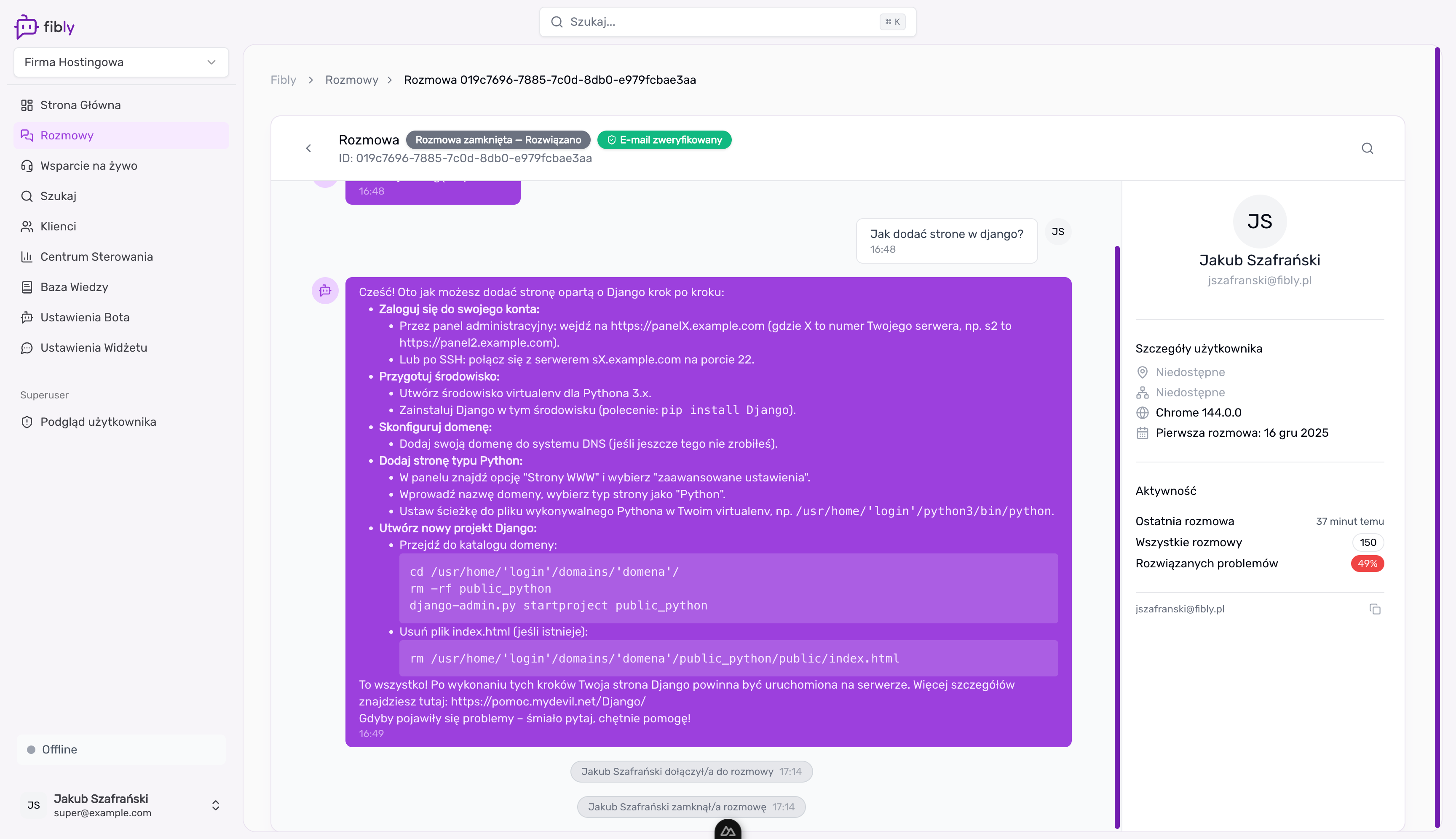
The bot answers from your knowledge base and from data it fetches through your API — server status, domain, ticket. When it can't help, it hands the conversation to your team live in the dashboard, or by email with the full history.
- Knowledge base from a URL, Markdown files and your own articles
- Live data from your panel through webhook tools
- Chat, email, WhatsApp, Messenger and Instagram in one inbox
Inbound sales
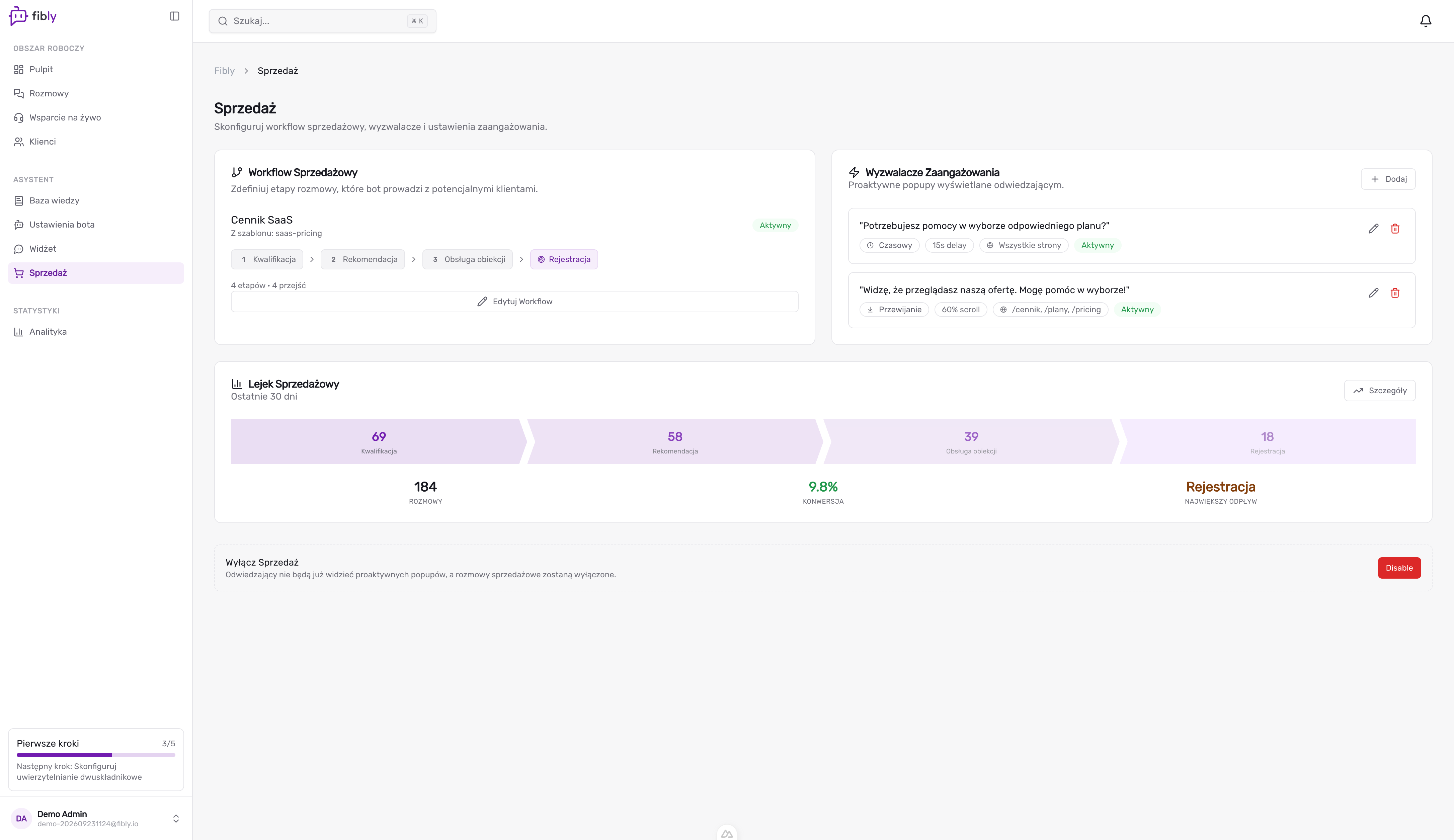
In sales mode Fibly engages visitors, answers questions about plans and migration, qualifies leads and books calls through Calendly. Hot leads go to a human.
- Sales mode with sales stages on conversations
- A welcome notification that opens the conversation
- Meetings through Calendly, payments through Stripe
Every channel
One inbox for every conversation
Your customers reach out wherever suits them — your website, email, WhatsApp, Messenger or Instagram. Fibly answers on all of them and brings every conversation together in one place.
- Every message in a single inbox
- The same bot and knowledge base on every channel
- Filter conversations by channel in one click
For teams that have a stack
Plugs into what you already run
You don't need a ready-made integration for your panel. An API is enough — the rest is configured in the Fibly dashboard.
Webhook API tool builder
Turn any HTTPS endpoint into a tool: server status, domain expiry, ticket lookup. WHMCS, Plesk, cPanel, DirectAdmin or your own panel — anything with an API. Per tool you decide whether it requires the customer's verified email and a confirmation, and every call can carry a signed token.
MCP client in chat
Expose an MCP server and the bot will discover its tools and use them in customer conversations — no per-endpoint setup.
Reports and AI insights
Control Center shows resolution rate, confidence and the top reasons for escalation. AI insight cards and a weekly summary tell you which article to write next.
Fibly MCP server
Your own agents will pull reports, search conversations and act on Fibly through MCP.
How a tool is built
Custom webhook tools documentation01
Add a connection — your API's base URL and credentials.
02
Describe a tool — method, path, parameters and when the bot should use it.
03
Set the gates — email verification and customer confirmation.
04
Test it from the dashboard and switch it on.
Cost
Fewer tickets for people, same team
Email, DNS, SSL and "is the server up" are most of a hosting queue. Fibly takes them, your technicians handle what really needs a human.
- Shorter first-response time
- No night shifts on first line
- Scale without another hire
Retention
Calm during an incident
When something breaks, everyone writes at once. The bot answers each of them immediately with what it knows from your system and knowledge base, and your team fixes instead of replying.
- One current answer for everyone asking
- Renewal questions about domains and hosting answered before a customer lapses
- Upgrade and migration questions passed to sales
Calculator
How much does your team lose on repetitive tickets?
Drag the sliders to fit your company. We estimate the support time Fibly takes off your plate.
Saved per month
PLN 4,860
per year PLN 58,320
108 h
hours recovered per month
650
tickets handled by AI
Want to see this on your own data? We'll show you the bot answering your customers' tickets.
an estimate based on your assumptions
We'll show you the bot on your hosting
30 minutes, no commitment. We'll talk through your needs and show how Fibly can answer your customers.
- We reply within one business day
- No contract and no setup fees to start
- You talk to the team that builds the product

Przemysław Markwart
Implementation consultant
Questions hosting teams ask us
Do I need a developer?
Not for the basics: paste the widget snippet, point Fibly at your knowledge base URL, and it answers. Connecting your panel through webhook tools takes a developer an afternoon — one connection and a handful of tools.
What can the bot read from my system?
Whatever you expose through an API: server status, domain expiry, ticket state, the customer's plan. WHMCS, Plesk, cPanel, DirectAdmin or your own panel — Fibly only sees the response you return.
Can it take actions, not just answer?
Yes — a tool can be a POST or PUT as well as a GET, for example to open a ticket. For sensitive actions turn on identity verification (the customer confirms their email first) and confirmation (the customer approves the specific call).
How is my API protected?
You choose the authentication (basic or bearer), and Fibly can sign every call with a short-lived token you verify against a public key. Custom webhooks are in controlled rollout — we enable them on request.
Can it tell customers about an outage?
Yes — if you connect your status endpoint as a tool, the bot reads the current state; otherwise it answers from a pinned article you keep updated. It answers only from the tool response or the pinned article.
What happens when it can't help?
It hands the conversation to your team with the full history. If nobody picks it up within the set time, you get an email with a summary.
What does it cost?
You start on a free plan; paid plans scale with the number of conversations. See the pricing page for details.